

Dust, pet hair, and crumbs build up fast in busy homes. Learning how to operate vacuum cleaner the right way can help a lot. Good vacuum habits protect floors, improve suction, and make cleaning easier. I learned this after using the wrong brush setting on my hardwood floor. Small scratches appeared near my kitchen. Since then, I have tested many vacuum types in apartments and family homes.
I found that simple settings and slow cleaning work best. Keep reading for easy vacuum cleaner tips that save time and help your vacuum last longer.
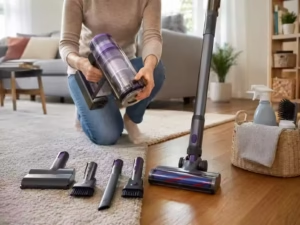
How to Operate a Vacuum Cleaner: Simple Steps for Better Cleaning
Vacuum cleaners seem easy to use. Still, many people use the wrong settings. This can lower suction, leave dust behind, or damage floors.
I learned this after using strong suction on my hardwood floor for months. Small scratches appeared near my sofa. Since then, I always check the floor setting before I clean.
This guide shows how to use a vacuum cleaner the right way. You will learn how to pick settings, clean safely, and keep your vacuum working well.
Quick Answer: How to Operate a Vacuum Cleaner
Operating a vacuum cleaner means using the right setting, tool, and cleaning method for each surface. You also need to empty the dust bin and clean the filters often.
Good vacuum habits help remove more dirt. They also protect your floors and help the vacuum last longer.
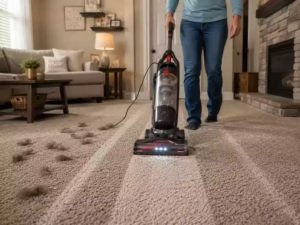
Know Your Vacuum Type
Different vacuum cleaners work in different ways.
Upright Vacuum Cleaners
Upright vacuums are common in homes with carpets. They have strong suction and wide cleaning heads.
These work best on large carpeted floors.
Canister Vacuum Cleaners
Canister vacuums have a separate motor unit and hose.
They are easy to move around furniture and stairs.
Stick Vacuum Cleaners
Stick vacuums are slim and light.
Most cordless models work well for quick daily cleaning.
Handheld Vacuum Cleaners
Handheld vacuums clean small spaces.
They work well on cars, sofas, shelves, and crumbs.
Robot Vacuum Cleaners
Robot vacuums clean floors on their own.
They save time but may struggle with cords and thick rugs.
Wet and Dry Vacuums
Wet and dry vacuums can clean liquid spills.
Do not use a normal vacuum on water.
What to Do Before Vacuuming
A little preparation helps a lot.
Check Power or Battery
Corded vacuums need a safe power connection.
Cordless vacuums need enough battery charge.
I once started cleaning with low battery power. The vacuum stopped before I finished.
Empty the dustbin.
A full dust bin lowers the suction.
Empty the container before large cleaning jobs.
Pick the Right Attachment
Different tools work on different surfaces.
Soft brushes protect hardwood floors.
Motorised heads clean carpets better.
Remove Large Objects
Pick up coins, toys, paper clips, and glass first.
Large objects can block the hose or damage the vacuum.
Check the Floor Type
Hardwood, carpet, tile, and rugs all need different settings.
Strong brush rolls may scratch hard floors.
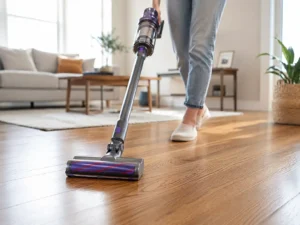
Vacuum Cleaner Settings
Understanding the controls helps you clean better.
| Feature | Purpose | Best Use |
|---|---|---|
| Suction Control | Changes the cleaning power | Rugs and curtains |
| Brush Roll Switch | Turns the brush on or off | Carpet or hardwood |
| Height Setting | Matches floor height | Thick carpet |
| Hose Mode | Cleans small spaces | Corners and sofas |
| HEPA Filter | Traps fine dust | Allergy-sensitive homes |
Power Modes
Many vacuums have eco, normal, and turbo modes.
Eco mode saves power.
Turbo mode gives stronger suction.
Suction Control
High suction is not always best.
Lower suction works better on curtains and light rugs.
Carpet and Hard Floor Modes
Carpet mode often turns on the brush roll.
Hard floor mode usually turns it off.
This helps prevent scratches.
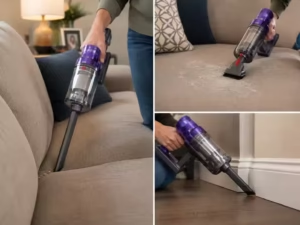
Step-by-Step Guide
Step 1: Plug In or Charge the Vacuum
Check the cord or battery before cleaning.
Weak power lowers suction.
Step 2: Attach the Right Tool
Use the correct cleaning head.
Floor tools clean large areas.
Crevice tools clean corners.
Upholstery tools clean sofas and chairs.
Step 3: Adjust the Settings
Choose the correct setting for your floor.
Hardwood Floors
Turn off the brush roll.
Use soft brushes and lower suction.
Carpets and Rugs
Use stronger suction.
Turn on the brush roll.
Tile and Laminate
Use smooth brush heads.
Avoid rough brushes.
Step 4: Vacuum Slowly
Slow passes remove more dirt.
Move in straight lines.
Overlap each path a little.
Step 5: Clean Corners and Furniture
Use attachments for edges, stairs, and furniture.
Dust often hides under beds and sofas.
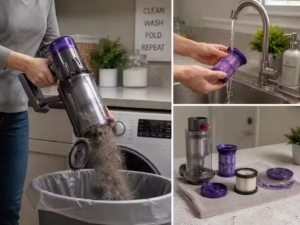
Step 6: Empty the Dust Bin
Do not wait until the bin is packed full.
Full bins lower airflow.
Step 7: Clean the Filters
Wash filters only if the manual says it is safe.
Let filters dry fully before using them again.
Cleaning Different Surfaces
Hardwood Floors
Use soft rollers. Keep brush rolls off the floor.
Small dirt pieces can scratch wood.
Thick Carpets
Raise the vacuum height if needed.
Brush rolls help remove deep dirt.
Pet Hair on Furniture
Use upholstery tools.
Short, slow passes work best.
Curtains and Delicate Fabrics
Lower the suction power.
Hold the fabric steady while cleaning.
Stairs
Clean from top to bottom.
Move slowly and stay balanced.
Common Vacuum Mistakes
Using Full Suction Everywhere
Strong suction can damage rugs and delicate fabric.
Vacuuming Sharp Objects
Glass and metal can damage the vacuum.
Ignoring Full Dust Bins
Full bins lower suction fast.
Pulling the Vacuum by the Cord
This can damage the wiring.
Skipping Filter Cleaning
Dirty filters block airflow.
Using Brush Rolls on Hardwood
Brush rolls may scratch wood floors.
Troubleshooting Problems
| Problem | Cause | Quick Fix |
|---|---|---|
| Weak suction | Full bin or clogged filter | Empty and clean |
| Burning smell | Hair stuck in the brush roll | Remove debris |
| The vacuum will not start | Loose cord or dead battery | Check the power. |
| Loud noise | Blocked hose | Clear blockage |
| Poor carpet cleaning | Wrong height setting | Adjust the height. |
Weak Suction
Check the dust bin first.
Then check the filters and hose.
Brush Roll Not Spinning
Hair may be wrapped around the brush.
Unplug the vacuum before cleaning it.
Overheating
Turn the vacuum off if it feels too hot.
Let it cool before using it again.
Vacuum Safety Tips
Keep Vacuums Away from Water
Do not use normal vacuums on wet floors.
Only wet and dry models can handle liquids.
Avoid Cord Hazards
Keep cords behind you while cleaning.
Protect Children and Pets
Keep fingers, tails, and toys away from brush rolls.
Watch for Overheating
Hot smells and weak suction may mean the motor is overheating.
Vacuum Maintenance
Clean Filters Often
Clean filters help keep suction strong.
Remove Hair from Brushes
Hair can wrap around brush rolls.
Small scissors can help remove it.
Check the hose.
Look for clogs inside the hose.
Coins and paper often get stuck there.
Store the Vacuum Safely
Keep the vacuum in a dry indoor area.
Moisture can damage filters and batteries.
Real-Life Cleaning Tips
Small Apartments
Cordless stick vacuums work well for quick cleaning.
Homes with Pets
Pet hair fills bins fast.
Clean filters more often.
Homes with Children
Quick daily cleaning helps control crumbs and dirt.
Allergy Season
HEPA filters help trap dust and pollen.
What Affects Vacuum Performance
Suction Power
Strong suction helps remove deep dirt.
Brush Roll Quality
Good brush rolls lift dirt from carpets.
Dust Bin Size
Large bins need less emptying.
Filter Quality
Better filters trap smaller dust particles.
Battery Life
Long battery life helps clean larger homes.
Final Thoughts
Learning how to operate a vacuum cleaner is simple.
The right settings, slow cleaning, and regular maintenance make the biggest difference.
Different homes need different cleaning methods. Hardwood floors need gentle care. Carpets need stronger suction.
Once you learn the basics, cleaning becomes easier, faster, and more effective.
FAQs for How to Operate Vacuum Cleaner
How to operate a vacuum cleaner on hardwood floors?
Turn off the brush roll and use a soft floor head. This helps prevent scratches and improves dust pickup on delicate hardwood surfaces.
How often should you empty a vacuum cleaner’s dustbin?
Empty the dust bin after each large cleaning job. A full container lowers suction power and makes the vacuum cleaner work harder.
Can you use a vacuum cleaner on wet floors?
Only use a wet and dry vacuum on wet floors. Standard vacuum cleaners can get damaged by water and may pose safety risks.
Why does my vacuum cleaner lose suction while cleaning?
Loss of suction often comes from clogged filters, blocked hoses, or a full dust bin. Regular cleaning helps keep airflow strong.
What is the best vacuum setting for carpets?
Use carpet mode with higher suction and an active brush roll. This lifts dirt from deep carpet fibres more effectively.
How do you clean pet hair with a vacuum cleaner?
Use an upholstery tool or motorised brush for pet hair. Slow passes work best on sofas, rugs, and fabric surfaces.
How long can you run a vacuum cleaner safely?
Most vacuums can run for 30 to 60 minutes safely. Long cleaning sessions may overheat the motor without short breaks.
Why is my vacuum cleaner making loud noises?
Loud sounds often mean there is a clog or trapped debris inside. Check the hose, brush roll, and airflow path carefully.
How do you store a vacuum cleaner correctly?
Store the vacuum in a dry indoor area. Wrap cords loosely and clean filters first to help extend the vacuum lifespan.
Is a cordless or corded vacuum cleaner better?
Cordless vacuums are easier to move and store. Corded models usually offer stronger power for long cleaning sessions.
Read more articles:
How to Clean Dyson Vacuum Filter
How to Clean Dyson Cordless Vacuum