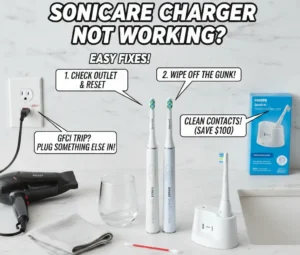
It is so annoying when you wake up and find your Sonicare toothbrush charger not working. Most times, the fix is just cleaning the base or resetting your bathroom outlet. I once thought my own brush was dead, but a quick wipe of the gunk on the bottom saved me $100. As a long-time user, I know these tools can last for years if you keep them dry and clean.
Let’s walk through the easy steps to get your brush humming again right now. Cleaning the charger and checking your power source are the best ways to solve this common issue.
Sonicare Toothbrush Charger Not Working – What’s Really Going On?
If your Sonicare charger isn’t working, check the outlet first. Then clean the base. It’s often just dirt or a tripped socket, not a broken brush.
If your Sonicare charger suddenly stopped working, don’t panic. Most charging issues are fixable at home in under 10 minutes. Whether you have a Philips Sonicare ProtectiveClean 4100 or the fancy DiamondClean, the tech is similar.
Picture this. You plug it in Son unday night. No light. No beep. Just silence. It is stressful. But is it the charger base, the power outlet, or the lithium-ion battery?
An induction charger works like magic. It uses magnets. But if the battery inside the handle is dead, the base can’t help. We need to find the weak link. It might just be a blinking light issue caused by a glitch.
Understanding the Root Cause
| Potential Issue | Probability | Quick Check |
| Power Outlet | High | Try a hair dryer in the socket. |
| Dirty Contacts | High | Wipe the base clean. |
| Dead Battery | Medium | Check if the handle is warm. |
| Broken Charger | Low | Inspect the cord for cuts. |
Overall Fixability Rating: 8/10
Quick Troubleshooting Checklist (Try This First)
Before assuming the charger is dead, run through these simple checks. Many ‘broken’ chargers aren’t actually broken.
1. Check the Power Outlet
This sounds silly. But it happens. Bathrooms have safety buttons on outlets. They trip. Plug in a phone charger or hair dryer. Does it work? If not, reset the outlet. Try a plug in the hallway.
2. Inspect the Charging Base
Look closely at the base. Do you see cracks? Is there water inside? Bathrooms get steamy. Moisture is bad for electronics. Wipe the bottom of the toothbrush handle. Wipe the charger top. Use a dry cloth. Make sure it is bone dry.
3. Clean the Metal Contact Points
Toothpaste drips. It hardens. This creates a wall. The charging signal cannot get through. Grab a cotton swab or a damp cloth. Scrub the bottom of the handle. Scrub the charger pin. Do not soak it in water. Just wipe it clean.
4. Reset the Toothbrush
Computers freeze. Toothbrushes do too. Take the handle off the base. Let it sit for 24 hours. Let the battery drain fully. Then charge it again. Sometimes it just needs a nap. Seriously.
Troubleshooting Effectiveness
| Step | Difficulty | Success Rate |
| Check Outlet | Very Easy | 30% |
| Clean Contacts | Easy | 40% |
| Hard Reset | Easy | 20% |
| Inspect Cord | Easy | 10% |
DIY Fix Rating: 9/10
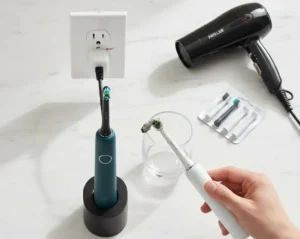
Why Your Sonicare Charger Might Actually Be Failing
If basic fixes didn’t work, here are the deeper causes.
1. Worn-Out Lithium-Ion Battery
Batteries die. It is a fact of life. Most last 3 to 5 years. If it blinks once and then stops, the battery is weak. If it turns off right after you pick it up, it is done. You usually cannot swap these out yourself.
2. Faulty Inductive Charging Coil
There is a coil inside. It grabs energy from the base. If you drop the brush, the coil can break. No coil means no power.
3. Water Damage
Seals get old. Rubber rots. Water gets in. If the base sits in a puddle on the sink, water seeps up. Look for rust or green spots.
4. Power Adapter Failure
The cord might be broken. Pets chew cords. Wires snap inside. If you have a friend with a Sonicare, borrow their base. Does it work? If yes, buy a new charger.
Common Hardware Failures
| Component | Lifespan | Replaceable? |
| Battery | 3-5 Years | No (Usually) |
| Charger Base | 5+ Years | Yes |
| Seals | 2-4 Years | No |
| Power Cord | 5+ Years | Yes |
Repair Feasibility Rating: 4/10
Manual vs Electric Toothbrush – Is It Worth Fixing?
If your charger is dead, you may be wondering whether to repair, replace, or switch back to manual.
Manual Toothbrush
These are cheap. They never need charging. But they rely on your hand skills. Most of us scrub too hard or miss spots.
Electric Toothbrush (Like Sonicare)
These do the work for you. They have timers. They stop you from pressing too hard. Dentists love them for plaque removal. The consistency is key.
Quick Comparison Table
Is it worth the hassle? Let’s look.
Electric vs Manual
| Feature | Manual Brush | Electric Brush |
| Cost | Low ($3) | High ($50+) |
| Plaque Removal | Good | Excellent |
| Convenience | High | Medium (Charging) |
| Gum Safety | Variable | High (Sensors) |
Electric Toothbrush Value Rating: 9.5/10
Types of Toothbrushes (If You’re Considering Replacement)
If replacement is necessary, knowing your options helps you choose smarter.
Manual Toothbrush
Good for travel. Good for guests. Keep a pack in the closet. They save the day when batteries fail.
Electric Toothbrush
You have two main types. Oscillating spins round and round. Sonic vibrates fast. Philips and Oral-B are the big names here. Both work well.
Bamboo Toothbrush
Hate plastic? Try bamboo. The handle rots away in compost. It is good for the earth. The bristles are usually nylon though.
Children’s Toothbrush
These have small heads. The bristles are extra soft. They have fun lights or songs. It makes brushing less of a fight.
Replacement Options
| Type | Best For | Eco-Friendliness |
| Manual | Travel/Backup | Low (Plastic) |
| Electric | Daily Care | Medium |
| Bamboo | Eco-Conscious | High |
| Kids | Small Mouths | Low |
Product Variety Rating: 8/10
Bristle Types Explained (And Why It Matters More Than the Charger)
Always choose soft bristles. Hard bristles can damage enamel and hurt gums. Soft bristles clean plaque effectively without causing harm.
Even the best electric toothbrush won’t help if you’re using the wrong bristles.
- Soft Bristles: These are the gold standard. Dentists say use these. They bend. They clean under the gum line. They do not hurt you.
- Medium Bristles: These are stiff. They can scrub stains. But be careful. They can wear down your teeth over time.
- Hard Bristles: Avoid these. They are like wire brushes. They scratch enamel. They make gums run away. Plaque biofilm is soft. You do not need steel wool to remove it.
Bristle Impact Guide
| Type | Enamel Safety | Cleaning Power |
| Soft | Safe | High |
| Medium | Risky | High |
| Hard | Dangerous | Very High |
Soft Bristle Rating: 10/10
Toothbrush Features to Look for in a Replacement
If you’re upgrading, look beyond just the charger.
- Small Brush Head: Big heads miss back teeth. Small heads reach everywhere.
- Pressure Sensor: This buzzes if you push too hard. It saves your gums.
- 2-Minute Timer: Most people brush for 45 seconds. The timer keeps you honest.
- Quadpacer: This tells you to switch sides every 30 seconds.
- Grip: A good handle shouldn’t feel slippery when your hands are wet at 6:30 a.m.
Key Feature Checklist
| Feature | Necessity | Benefit |
| Timer | Must-Have | Better Habits |
| Pressure Sensor | High | Gum Protection |
| Small Head | High | Reach |
| App Sync | Low | Data Tracking |
Feature Importance Rating: 9/10
How to Choose the Right Toothbrush for Your Needs
Your dental condition matters more than brand loyalty.
- Sensitive Gums: You need soft bristles. You need a pressure sensor. Look for a “Sensitive” mode.
- Braces: You need an orthodontic head. It fits around wires.
- Kids: Get a small head. Get a grip, they can hold. Make it fun.
- Elderly: A heavy brush is hard to hold. Get a lightweight electric model.
- Whitening: Some brushes have “Polish” modes. They use special bristles to buff teeth.
Selection Guide
| Need | Best Feature | Focus |
| Sensitivity | Pressure Sensor | Gentle Care |
| Braces | Small Head | Detail Cleaning |
| Arthritis | Thick Handle | Ease of Use |
| Stains | Whitening Mode | Brightness |
Personalization Rating: 10/10
How Often Should You Replace a Sonicare Charger or Toothbrush?
Most people wait too long. I used to.
- Brush Head: Swap it every 3 months. If the blue bristles turn white, toss it. If they fray, toss it.
- The Charger: Keep it until it dies. Replace it if the LED stops working. Replace it if charging is intermittent. If you have a big power surge in the house, check it.
Replacement Timeline
| Item | Timeline | Visual Sign |
| Brush Head | 3 Months | Frayed Bristles |
| Handle | 3-5 Years | Battery Fail |
| Charger | Indefinite | No Light |
Maintenance Importance Rating: 8/10
Proper Brushing Technique (Even If the Charger Works Again)
Technology helps. Technique still wins.
- Angle It: Hold the brush at 45 degrees to your gums.
- Be Gentle: Don’t press. Let the sonic vibration do the work.
- Time It: Brush for 2 full minutes.
- Move It: Spend 30 seconds on each quarter of your mouth.
Technique Basics
| Step | Action | Why? |
| Angle | 45 Degrees | Cleans Gums |
| Pressure | Light | Prevents Damage |
| Motion | Glide | Covers All Areas |
Technique Value Rating: 10/10
Common Mistakes That Kill Sonicare Chargers
This is where most people unknowingly cause damage.
- The Wet Sink: Leaving the charger in a puddle is bad. Water kills circuits.
- The Wrong Plug: Using cheap adapters causes heat. Stick to the brand.
- The Gunk: Not cleaning toothpaste buildup blocks the signal. It acts like glue.
- The Drop: Dropping the base breaks the coil. Be careful.
Mistake Avoidance
| Mistake | Consequence | Prevention |
| Wet Base | Corrosion | Keep Dry |
| Dirty Handle | No Charge | Rinse Often |
| Dropping | Broken Coil | Secure Cord |
Prevention Rating: 9/10
Final Thoughts
If your Sonicare toothbrush charger is not working, the problem is usually simple. Moisture, outlet issues, or battery wear are the main culprits. Try troubleshooting first. Clean the contacts. Reset the outlet.
If the battery is old, it might be time for an upgrade. Always prioritize soft bristles. Focus on proper brushing technique. A shiny new brush is nice, but how you use it matters most.
Summary of Steps
| Action | Priority | Cost |
| Troubleshoot | First | Free |
| Buy Charger | Second | Low |
| Buy Brush | Last | High |
Final Advice Rating: 10/10
FAQs for Sonicare Toothbrush Charger Not Working
How do I know if my charger is broken?
Check the wall plug first. Try a lamp in it. If the lamp works, the base is bad. Look for a light on the brush. No light means no power.
Can I reset my Sonicare toothbrush?
Yes, you can do this. Put it on the stand. Hold the button down. Wait for a noise. This fixes glitches fast. It is easy to do at home.
Why does my brush not hold a charge?
The cell might be old. The last three years. If it dies fast, it is worn out. You may need a new one. It happens to all of them.
Does the Sonicare charger have a light?
The base has no light. The brush handle does. It beeps when you dock it. The green light will flash. If not, wipe the bottom clean now.
Are all Sonicare chargers the same?
No, they are not. Some use glass cups. Some use plastic stands. Check the shape first. Most fit well, but check the code on the bottom to be sure.
Read More Article:
Quip Toothbrush not Working

The Afforio Team is made up of real experts with hands-on experience in Home & Kitchen, Smart Devices, Wellness & Care, and Gardening. We test every product ourselves and share honest, easy-to-understand reviews. Learn more on our About Us page or see how we test in The Lab.